Early Access Roadmap
Paralives Roadmap: What Is Live, Planned, and Worth Tracking
This source-aware guide explains how to read the Paralives roadmap during Early Access without confusing official commitments, playable features, and fan speculation.
Quick answer
How to read the Paralives roadmap in 2026
Paralives entered Steam Early Access on May 25, 2026, so the roadmap should be treated as a living update path rather than a fixed finished-game checklist. The safest way to track it is to separate three things: what is playable in the current Steam build, what Paralives Studio has described as a planned Early Access direction, and what the community hopes to see later.
For players, the most important roadmap areas are build mode expansion, Paramaker depth, live mode systems, performance and stability, Steam Workshop or mod support, and update communication. These topics match the way most life-sim players evaluate whether to buy now, wait for a later update, or follow development first.
This page does not replace the official Steam page, developer posts, or official FAQ. It gives a practical reading framework so you can avoid outdated videos, copied speculation, unsafe download pages, and feature lists that do not say which version they describe.
As of June 2026, the practical roadmap signal is split between the official development page, Steam update posts, patch notes, and the public full roadmap. Use this guide as a reading map: confirm what is playable now, separate planned Early Access additions from speculation, then decide whether the current build matches the way you want to play.
Short version: use Steam and official Paralives channels for the current build, then use fan guides like this one to understand what each roadmap area means for actual play.
Current roadmap status at a glance
Playable status
Confirmed route
Paralives is available through Steam Early Access. Buy or download only through the official Steam store page and verify platform support there.
Main update themes
High-value areas
Build mode, Paramaker, Parafolk behavior, live mode routines, object content, performance, and community content are the areas players should watch closely.
Version risk
Early Access caveat
Mechanics, balance, UI labels, save behavior, and mod compatibility may change. Always check the date of any guide before relying on it.
Fan-site boundary
Not official
Paralives Blog is independent. When a detail affects purchase, compatibility, or promised features, follow the official source instead of a fan summary.
Patch cadence
Short-term updates
Recent official posts emphasize bug fixes, optimization, quality-of-life changes, and known-issue repair. Treat month-to-month patches as the best signal for what is improving right now.
Roadmap areas to track
| Area | What to verify now | What to watch next |
|---|---|---|
| Build Mode | Check current room tools, object placement, furniture resizing, curved or flexible building options, and sharing workflow. | Look for new build objects, quality-of-life tools, Workshop integration, and changes that affect saved houses. |
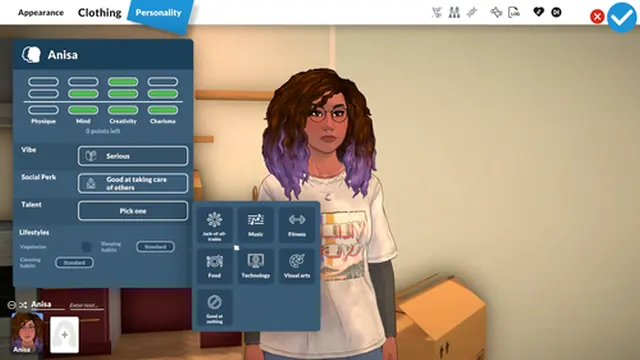
| Paramaker | Review current body customization, outfits, colors, household setup, personality labels, and styling controls. | Track added clothing, deeper identity options, relationship setup, and character data that may affect old households. |
| Live Mode | Verify needs, interactions, daily routines, jobs, social activities, and town systems in the current build. | Expect live simulation systems to evolve heavily as Early Access receives feature and balance updates. |
| Mods and Workshop | Use only official Steam Workshop or developer-supported channels when available. Back up saves before testing community content. | Watch compatibility notes after each update because mods can break when UI, objects, or simulation rules change. |
| Performance and platforms | Use Steam for current PC and Mac requirements, controller notes, languages, and compatibility information. | Follow patch notes for performance improvements, crash fixes, loading behavior, and save-file stability. |
| Patches and quality-of-life updates | June 2026 posts mention hotfixes, crash and freeze work, save-file repair, and optimization priorities. | Track patch notes for stability, build mode fixes, live mode stutter improvements, and save compatibility notes. |
How to follow updates without getting misled
Start with the official Steam page
Steam is the practical source for current purchase status, Early Access notes, system requirements, update posts, price, screenshots, and platform labels. If another site gives different availability or download instructions, treat Steam as the source of truth.
Read official posts before old videos
Videos and community posts can be useful, but they may describe older builds. Prioritize posts from Paralives Studio and check publication dates before assuming a feature still works the same way.
Separate roadmap direction from release timing
A feature can be an intended direction without having a public release date. When a roadmap item has no date, do not plan saves, builds, or mod projects around it as if it were guaranteed for the next patch.
Keep a short update checklist
After each update, check build tools, Paramaker data, live mode behavior, mod compatibility, performance, and save loading. That small checklist catches most changes that affect everyday play.
Use the development page for feature boundaries
The official development page separates available features from Early Access plans. That distinction is more useful than a single fan checklist because it tells you what can be played now and what is still planned.

What the roadmap means for different players
Buy-now players
Check whether the current Early Access feature set already supports your main play style. Builders may be satisfied earlier than players waiting for deep live simulation.
Wait-and-see players
Follow patch notes until your must-have systems are present. Waiting is reasonable if you mainly care about long saves, advanced relationships, careers, or mod stability.
Guide readers
Prefer guides that name their update date, link official sources, and explain version limits. Avoid pages that promise downloads, APKs, cracked builds, or complete feature lists without sources.
Mod users
Treat every update as a compatibility event. Save backups and version notes matter more during Early Access than they do for a stable finished game.
Returning players
If you paused after launch week, read the newest patch notes before starting a serious save. Stability, known issues, and build-mode behavior can change faster than broad roadmap categories.
Paralives roadmap FAQ
Is there a fixed Paralives roadmap?
There are official directions and update communications, but Early Access roadmaps can change. Treat public roadmap language as planning context and verify current details through Steam and official Paralives channels.
What is the best roadmap feature to watch first?
Build mode and live mode are the best starting points. Build mode is a major reason players follow Paralives, while live mode updates determine how deep long-term household play becomes.
Does the roadmap include mods or Steam Workshop?
Community content and Workshop expectations are important topics to watch, but exact support details should be checked against official update notes. Back up saves before using experimental mods.
Should I buy Paralives now or wait?
Buy now only if the current Steam Early Access build already fits what you want to play. If you need complete live mode depth, mature mod support, or long-save stability, follow updates before buying.
Where should I check official roadmap changes?
Start with the official Steam store page and Paralives Studio channels. Use fan pages for explanation, not as the final source for price, compatibility, release dates, or promised features.
Where is the full Paralives roadmap?
The official development page links to the full roadmap and summarizes available Early Access features. Use that source for the current feature boundary, then read recent patch notes for what changed after launch.