Guia de mods e Workshop
Guia de mods de Paralives: use o Steam Workshop sem arriscar seu save
Um guia para quem quer conteudo personalizado, lotes, familias e mods do Workshop em Paralives com seguranca durante o acesso antecipado.
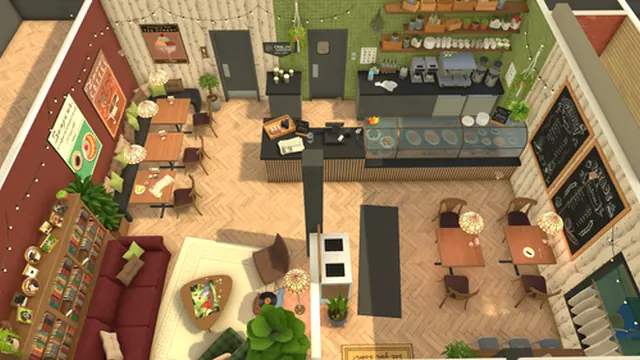
Resposta rapida
Paralives tem suporte a mods?
Sim. A FAQ oficial de Paralives diz que jogadores podem compartilhar criacoes, conteudo personalizado e mods pelo Steam Workshop. Esse e o caminho mais seguro porque fica ligado ao Steam, as paginas dos criadores, historico de atualizacao, controles de inscricao e moderacao da comunidade.
O limite principal envolve script mods. A FAQ oficial diz que eles nao estao planejados no momento. Mesmo assim, itens nao-script nao sao automaticamente seguros para todo save: lotes, familias, objetos, estilos e modpacks dependem da versao do jogo e da manutencao do criador.
O fluxo mais seguro e abrir o Workshop pelo Steam ou pelo jogo, instalar poucos itens por vez, testar em um save duplicado, confirmar onde o conteudo aparece e manter backup manual antes de usar em uma historia importante.
Esta pagina cobre uma intencao diferente dos guias de preco, requisitos e Paramaker: onde encontrar conteudo, como escolher o que instalar, o que salvar antes e como lidar com atualizacoes do acesso antecipado.
Resumo: use primeiro o Steam Workshop, evite mirrors nao oficiais, instale poucos itens por vez e mantenha um save limpo antes de testar conteudo novo.
O que tem suporte oficial agora
Paralives mod guidance should start with official boundaries before community tips. These are the practical status checks to make before installing anything.
Steam Workshop is the main route
Official channel
Use the Paralives Steam Workshop for browsing, subscribing, updates, creator pages, and item management. It is safer than random file mirrors.
Custom content is expected
Creations and CC
The FAQ describes sharing creations, custom content, and mods through Workshop. That can include items such as lots, households, objects, or visual content depending on the current tools.
Script mods are not planned now
Important limit
Do not assume deep script-style modding is part of the current official plan. Treat any claim about unsupported script mods cautiously.
Early Access changes matter
Version risk
Game updates can alter objects, UI, saves, Workshop categories, and compatibility. Check item dates and recent comments before using a mod in a serious save.
Fan site boundary
Not official
Paralives Blog explains safe habits but does not host mods, verify every creator file, or replace Steam and official developer notes.
Workshop scale is growing
High activity
The official June 2026 Workshop news post highlighted a large number of uploaded items, so filtering and cautious testing are more useful than installing everything popular.
Fluxo seguro para o Steam Workshop
- Open the official Workshop. Start from the Steam store/community page or an in-game Workshop button when available. Avoid search results that promise standalone downloads, cracks, or APK-style installers.
- Read the item page before subscribing. Check the category, description, required content, update date, creator notes, screenshots, comments, and whether the upload matches the current Early Access build.
- Install only a few items at a time. Small batches make troubleshooting possible. If you add twenty items at once, you will not know which one caused a missing object, broken lot, or strange save behavior.
- Use a test save first. Create a duplicate save or a disposable household before adding a new modpack, lot, or household to a serious story.
- Check the right in-game library. Lots, households, and mod content may appear in different places. Read the creator's instructions and verify the content before assuming it failed.
- Keep a simple mod log. Write down item names, creator names, install dates, and why you installed them. That log makes it easier to remove content after updates.
- Review after every patch. When Paralives updates, check Workshop comments and official notes before loading your most important save with all content enabled.
Checklist de compatibilidade
Use this table when deciding whether a Workshop item belongs in a main save, a test save, or no save at all.
| Area | Risk | Best action |
|---|---|---|
| Lots and buildings | A lot may use objects, sizes, or placement tricks that behave differently after updates. | Place it in a duplicate town first and check routing, missing items, and performance. |
| Households and Parafolks | Household uploads may include styling choices, bios, or dependencies that do not match your current content. | Import into a test household, inspect clothing and appearance, then save your own clean copy. |
| Objects and furniture | Object content may change balance, clipping, placement, or load behavior. | Install a small batch, test build mode, then remove anything that causes visual or routing issues. |
| Modpacks | Large packs are harder to diagnose because many changes arrive together. | Read the changelog and creator notes; avoid using large packs in a main save until they are updated for the latest patch. |
| Unsupported script claims | The FAQ says script mods are not planned at the moment, so off-platform script claims deserve extra caution. | Avoid unofficial executables and wait for official guidance before using anything that asks you to modify game files manually. |
Official gameplay video provides visual context for build, Paramaker, and live-mode systems that Workshop items may extend or remix.
Habitos de seguranca no acesso antecipado
Back up before testing
A manual backup is faster than rebuilding a favorite household after a broken item, missing dependency, or save conflict.
Prefer Workshop over mirrors
Steam gives you subscription controls, creator identity, update history, and a clearer removal path. Random download sites do not.
Check creator maintenance
A popular item can still become outdated. Recent comments, update dates, and patch notes matter more than total subscriber count.
Keep vanilla saves
Maintain at least one save without community content so you can confirm whether a problem comes from the game or from a Workshop item.
Avoid unsafe installers
Paralives does not need APKs, cracks, or third-party installers. If a page asks for those, it is not a safe Workshop path.
Respect content labels
Read item descriptions and age/content labels, especially for mature or strongly themed community uploads.
Erros comuns com mods
Installing everything popular
Popularity is not compatibility. Start with the one or two items that solve a real need in your save.
Ignoring item dates
Early Access updates can break assumptions quickly. A stale item page is a warning sign, especially after a major patch.
Using one save for testing
Always keep a separate test save. It is the simplest way to protect a long build or family story.
Trusting unofficial download pages
Download-intent searches often lead to mirrors and key-style pages. Use Steam Workshop and official channels instead.
Forgetting removal notes
Some content may leave missing items or changed households after removal. Read the creator's instructions before unsubscribing from a heavily used item.
FAQ de mods de Paralives
Where do I get Paralives mods?
Use the official Paralives Steam Workshop. It is the safest route for browsing, subscribing, updating, and removing community content.
Does Paralives support custom content?
Yes. The official FAQ says players can share creations, custom content, and mods through Steam Workshop.
Are script mods supported?
The official FAQ says script mods are not planned at the moment. Treat off-platform script claims cautiously unless official guidance changes.
Should I use mods in my main save?
Only after testing. Subscribe to a few items, use a duplicate save, and confirm that the content behaves correctly after the latest update.
Can I download Paralives mods outside Steam?
For safety, use Steam Workshop first. Avoid mirrors, cracked builds, APKs, executables, or pages that ask you to alter game files without official instructions.
What should I check after a Paralives update?
Check official patch notes, Workshop item comments, creator updates, missing content, lot routing, household appearance, and whether your main save still loads cleanly.