Build Mode Guide
Paralives Build Mode Guide: Build Better Houses From Your First Save
A practical, source-aware house building guide for Paralives players who want to understand flexible rooms, furniture placement, planning flow, and Early Access limits before starting a major build.
Quick answer
How to approach Paralives build mode
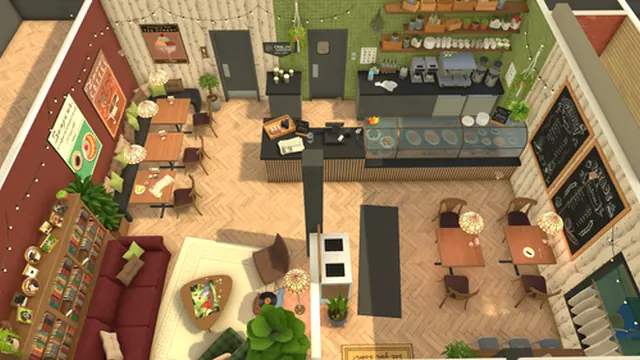
Paralives build mode is best approached like a flexible home-planning system rather than a strict grid puzzle. The appeal is not only placing walls and furniture; it is shaping rooms, resizing objects, experimenting with layouts, and adjusting a house until it supports the Parafolks who will live there. Start with the household story, sketch the essential rooms, then use decoration and detail passes after the structure works.
For a first build, keep the goal narrow: one small household, a simple kitchen and living area, one bathroom, enough sleeping space, and a clear route between core activities. Large dream houses are easier after you understand camera control, object placement, room proportions, and how much space Parafolks need around daily-use objects.
Because Paralives is in Early Access, every build guide should stay version-aware. Use this page as a planning framework, then confirm current tool names, Workshop behavior, save compatibility, and object availability through the official Steam page and Paralives Studio updates before relying on an old video or copied feature list.
Build mode searchers usually want practical house-building help, not a generic feature list. Start with room flow, object scale, and save-safe experiments; then use official patch notes to decide whether a specific advanced tool is stable enough for an important build.
Best first-build rule: block the house in broad shapes first, test the flow, then decorate. Do not spend an hour on tiny details before the rooms and routes make sense.
Core build mode ideas to learn first
The exact interface may change, but these concepts explain why Paralives building feels different from many life sims and where new players should focus attention.
Room shaping
Structure first
Think in zones: public rooms, private rooms, utility spaces, and outdoor transitions. A readable floor plan makes later decoration easier.
Furniture resizing
Scale with purpose
Resize furniture to solve proportion problems, not to hide layout issues. Check that oversized pieces still leave useful walking space.
Free placement
Controlled freedom
Use placement freedom for believable interiors: align seating, leave visual breathing room, and avoid blocking doors or narrow corridors.
Color and material passes
Unify the house
Choose a small palette for floors, walls, wood, and accent colors before adding many decorations.
Outdoor planning
Connect inside and outside
Porches, gardens, patios, and paths help the build feel like a real home instead of isolated rooms.
Version checks
Early Access habit
After updates, recheck saves, object behavior, and Workshop notes before continuing a complex build project.
Advanced widget caution
Save before testing
Patch notes have called out advanced widget behavior as version-sensitive. Use a duplicate save before moving or rotating key objects in a serious house.
A simple first-house workflow
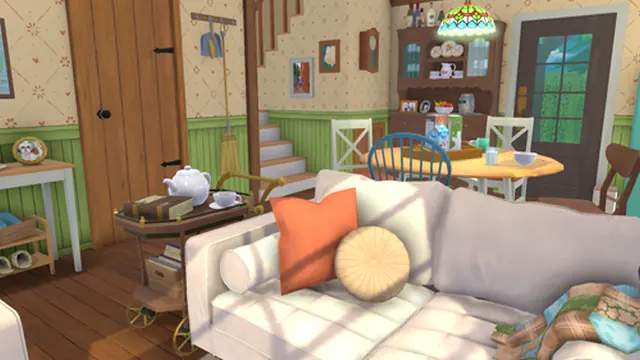
- Define the household. Decide who lives there, how many bedrooms are needed, and whether the home is cozy, modern, family-focused, studio-like, or built for storytelling.
- Place the footprint. Start with the outside shape and rough room sizes before choosing wallpapers or small objects.
- Build the activity loop. Connect entrance, kitchen, bathroom, sleeping area, social area, and outdoor access with routes that do not feel cramped.
- Add essential furniture. Place only the objects required for daily play first. This makes it easier to see whether the house actually functions.
- Check proportions. Look at door spacing, window placement, wall length, furniture scale, and whether each room has a clear purpose.
- Decorate in passes. Add color, lighting, rugs, plants, wall objects, and personal details after the functional layout is stable.
- Save and revisit. Keep a clean save before big changes. Early Access updates and experiments are easier to manage when you can roll back.
- Save before advanced edits. When testing unusual rotations, tight furniture placement, or large structural changes, create a manual save first so Early Access issues do not ruin the only version of a build.
Room planning checklist
Use this table before decorating. It keeps the house readable and helps avoid the most common beginner mistakes.
| Area | Goal | Build tip |
|---|---|---|
| Entry | Make the first route obvious. | Leave space for doors, coats, stairs, or a small transition area so the house does not open directly into clutter. |
| Kitchen | Keep cooking and eating close. | Plan counters, appliances, table access, and lighting before adding decorative shelves. |
| Living area | Create a social anchor. | Face seating toward a shared focus such as a TV, fireplace, window, or conversation area. |
| Bedroom | Protect private space. | Avoid pushing every object against a wall; leave enough side access and storage logic. |
| Bathroom | Prioritize routing. | Small bathrooms work when the door swing, sink, toilet, and bathing object have clear access. |
| Outdoor space | Support the story. | Paths, gardens, patios, and hobby corners make the lot feel planned rather than empty. |
Build mode tips that age well
Build small before building wide.
A compact house teaches scale faster than a mansion. Expand after the first floor plan feels natural.
Use screenshots as references.
Official screenshots and your own captures help you compare furniture density, lighting, and room proportions.
Repeat materials deliberately.
A repeated floor, trim, wood tone, or accent color makes a house cohesive without making every room identical.
Keep a version note.
Write down when a build was started and which update it used. This helps if an Early Access patch changes objects or saves.
Design for Parafolk routines.
Bedrooms, kitchens, bathrooms, social spaces, and outdoor routes should support how the household will actually live.
Leave unfinished zones.
A few empty corners are useful. They give you room for future Workshop items, new objects, or story changes.
Follow patch notes for tool behavior.
A build trick that works in one patch can change later. Before publishing a lot or starting a large project, skim recent patch notes for build mode fixes and known issues.
Common beginner mistakes
Decorating too early
If the room sizes are wrong, decoration only hides the problem. Finish the layout first, then add visual detail.
Forgetting traffic flow
A beautiful room can still feel bad if every route passes through a narrow corner, a blocked doorway, or a crowded object cluster.
Copying old videos blindly
Early Access tools can change. Use older videos for inspiration, but verify current behavior in the live build and official notes.
Making every room oversized
Large rooms are harder to furnish convincingly. Smaller spaces with clear purpose often feel more playable.
Ignoring the outside
The lot, paths, windows, and outdoor living areas affect how the house reads from the street and from the camera.
Ignoring routing and object recovery
Pretty rooms can still fail if Parafolks get stuck or objects behave oddly after reload. Leave movement space, test doors and stairs, and keep a backup save before using experimental placement.
Early Access limits and safe expectations
Treat build mode as a living system. Object lists, Workshop behavior, performance, and save compatibility can evolve as Paralives Studio ships updates. Before you begin a long project, check the current Steam notes and official channels.
If you plan to share builds, use clear version labels and avoid promising that a house will work forever. Community content is strongest when it says which game version, required content, and assumptions were used.
For performance, test large houses gradually. Dense furniture, many rooms, high-resolution displays, and background apps can affect smoothness, especially on systems near the minimum requirements.
During Early Access, some build-mode tools may be adjusted after player reports. Treat patch notes as part of the building workflow: they tell you when to retry a broken object, avoid a risky widget, or rebuild a room with fewer workarounds.
Paralives build mode FAQ
Is Paralives build mode beginner-friendly?
Yes, but it rewards planning. Start with a small house and learn room scale, object placement, and routing before attempting a huge lot.
What should I build first in Paralives?
A compact starter home is the best first project: kitchen, bathroom, bedroom, social area, and one outdoor feature.
Does Paralives use flexible building tools?
Paralives is known for flexible building and expressive house design. Exact tool names and limits should be verified in the current Early Access build.
Can I use this guide for old and future updates?
Use the workflow and planning advice broadly, but verify current objects, controls, Workshop support, and save behavior after each update.
Should I use mods or Workshop items in a first build?
For a first serious build, keep it mostly vanilla. Add community content later and keep backups so update compatibility is easier to manage.
Where can I check official build mode information?
Use the official Steam page, Paralives website, press kit, and Paralives Studio channels for current screenshots, notes, and feature status.
Does Paralives build mode already include every planned tool?
No. The official development page separates available build features from planned Early Access additions such as pools and advanced roof or stair tools. Build with the current toolset and check updates before assuming a planned feature is live.